
I may earn commission if you use my affiliate links to purchase products: More details.
I used WPX hosting until 2022 before moving to another managed WordPress hosting. But a lot has changed since then, so I’ve decided to test them again. In this article, I’ll share my findings and benchmark results of WPX hosting.
I’ve been running my blogs since 2013, and over the years I’ve tried a lot of hosting companies, starting my blogging career with HostGator and ending with the quite recent WordPress hosting brand Rocket.net, which offered Cloudflare Enterprise CDN.
For many years, WPX has been known as one of the fastest WordPress hosting providers for its speed and performance, thanks to its built-in CDN, WPX XDN.
One unique thing about WPX compared to most other managed WordPress hosting providers is that they offer LiteSpeed web servers (LSWS), which are faster than Nginx and Apache for WordPress.
Overview of WPX.net

Brand | WPX |
Website: | |
Year Founded: | 2013 |
Headquarters: | Sofia, Bulgaria |
Service Types: | WordPress hosting, Domain Registration, and email hosting |
Base Plan: | $17.99/mo on monthly plans or $14.99/mo on annual purchase |
Customer Support: | Forum, Email, Ticketing, and Chat |
Data Centers: | 3 data center locations and over 41 PoPs across the globe for its CDN |
Uptime: | 99.9% |
Reliability: | DDoS protection, Malware Scans & Free Removal, Daily Backups |
Refund policy: | WPX offers a 30-day money-back guarantee on hosting plans |
CDN: | Built-in CDN called WPX XDN |
Email hosting: | Available |
Control Panel: | Custom-built WPX control panel |
Domain Registration: | Available |
Competitors: |
WPX Specifications
WPX offers 3 data center locations: Chicago (USA), London (UK), and Sydney (Australia). The base starter plan provides 10 GB of storage and 100 GB of Bandwidth supporting 1 website. Talking about performance specs, it comes with 3GB RAM, 0.5 CPU Cores, and 9 PHP Workers.
In this test, I’m using the Professional plan that supports up to 15 websites, which comes with 15 GB RAM and 2 CPU Cores.
First, I tested WPX’s server performance using a WordPress plugin called the Hosting Benchmark tool.
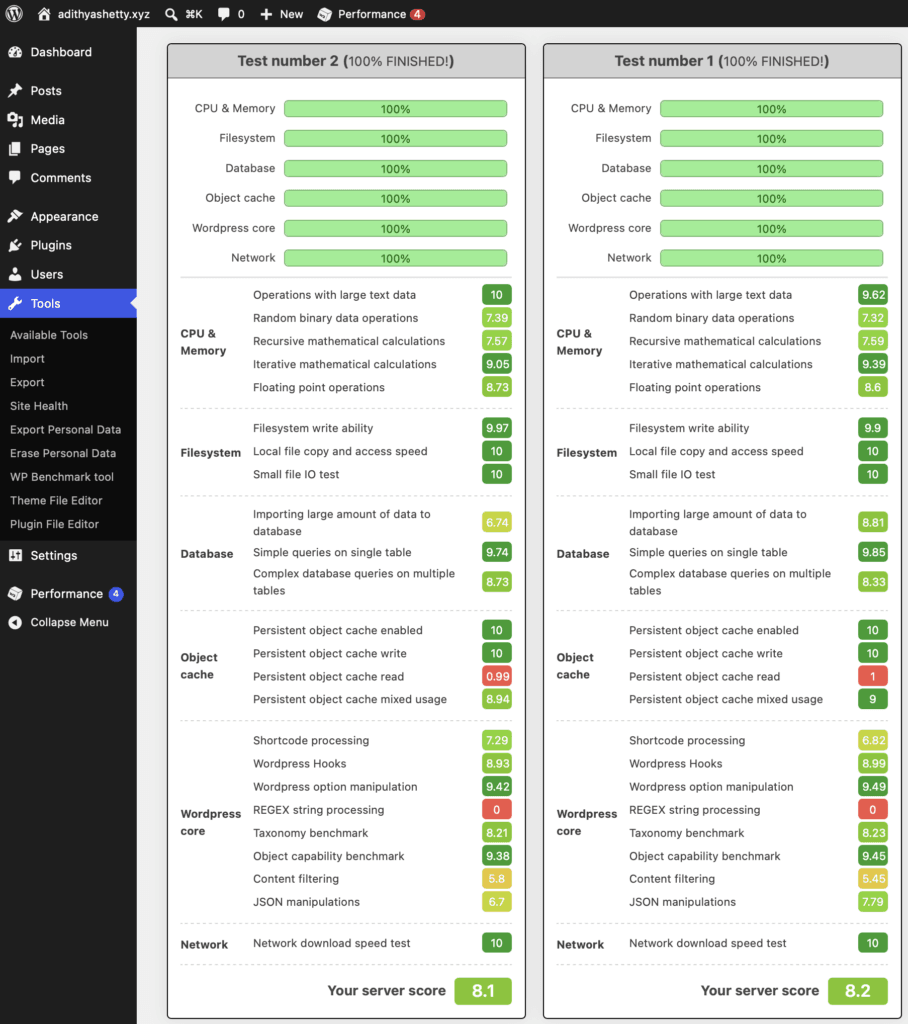
As you can see in the above screenshot, I conducted multiple tests to find the server’s benchmark. The Professional WPX plan I’m using doesn’t offer Redis, so I selected the disk method in the Object Cache settings on the W3 Total Cache plugin.
WPX.net server performed quite well, scoring over 8 out of 10. The write and read speeds are also good.
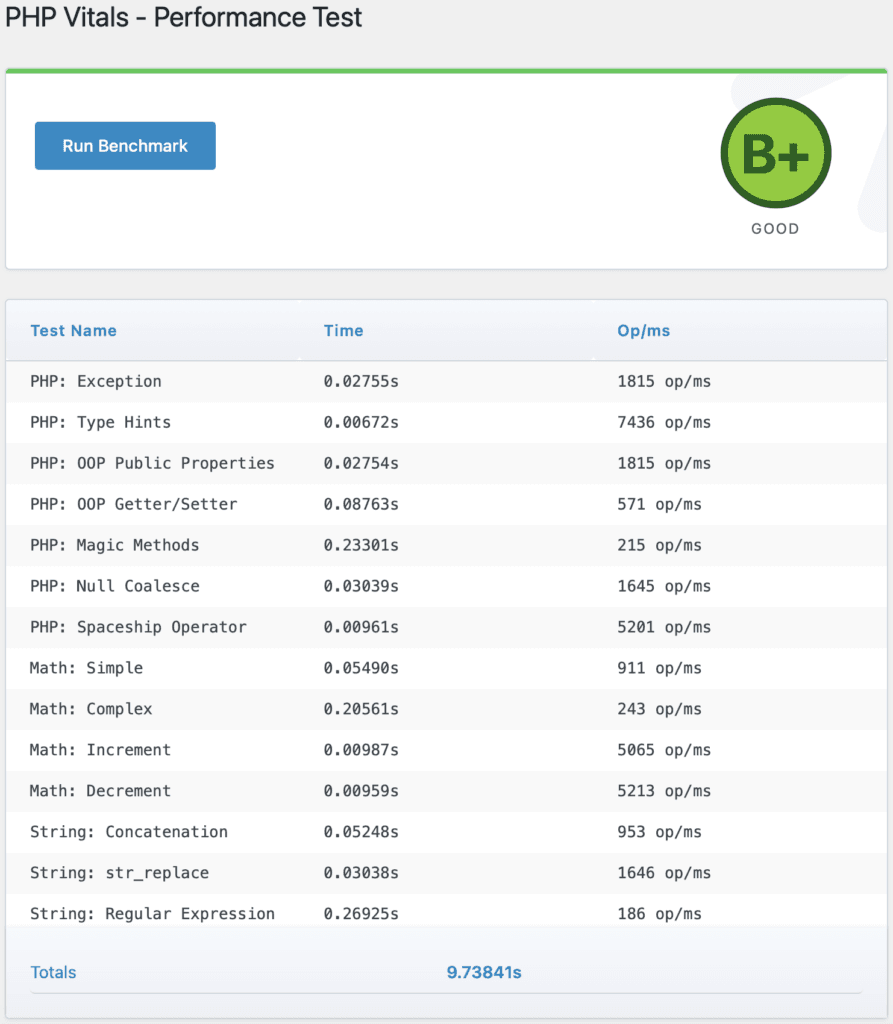
Next, I conducted PHP benchmarks using the PHP Vitals plugin. PHP Vitals plugin analyses your server using different tests of PHP execution.
After the test, it displays the grade from A+ to F based on your server performance. The WPX Professional plan I’m using got a B+. An A would have been nice, considering this plan costs $59.99 per month. Nevertheless, it’s still a good score.
Speed Test
Let’s do a speed test of WPX. I installed the Twenty Twenty-Four theme from the WordPress themes directory, which has some demo content.
WPX enables its built-in CDN and W3 Total Cache plugin by default, so I’ll keep it that way.
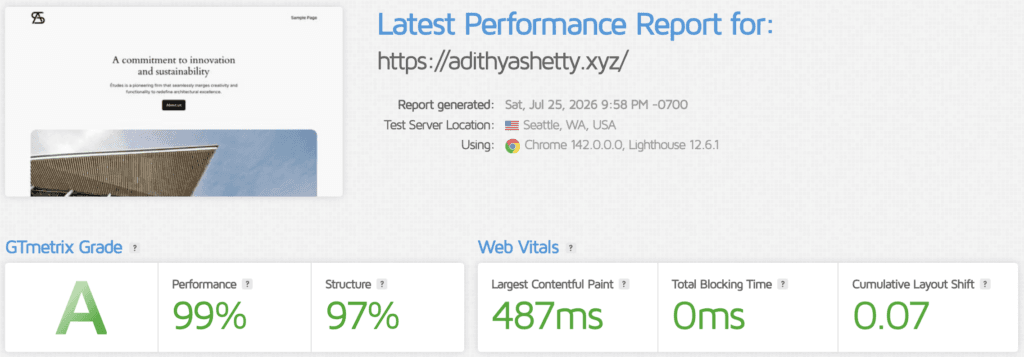
GTmetrix speed test of a demo site hosted on WPX.net scored near 100 on both performance and structure with default settings.
TTFB (with WPX XDN)
TTFB (Time to First Byte) refers to a metric that measures the time the browser takes to receive the first byte of data from a web server.
With a CDN, you can reduce the TTFB score across the world. WPX offers its own built-in CDN called XDN with over 41 PoPs (Points of Presence).
So let’s test that:
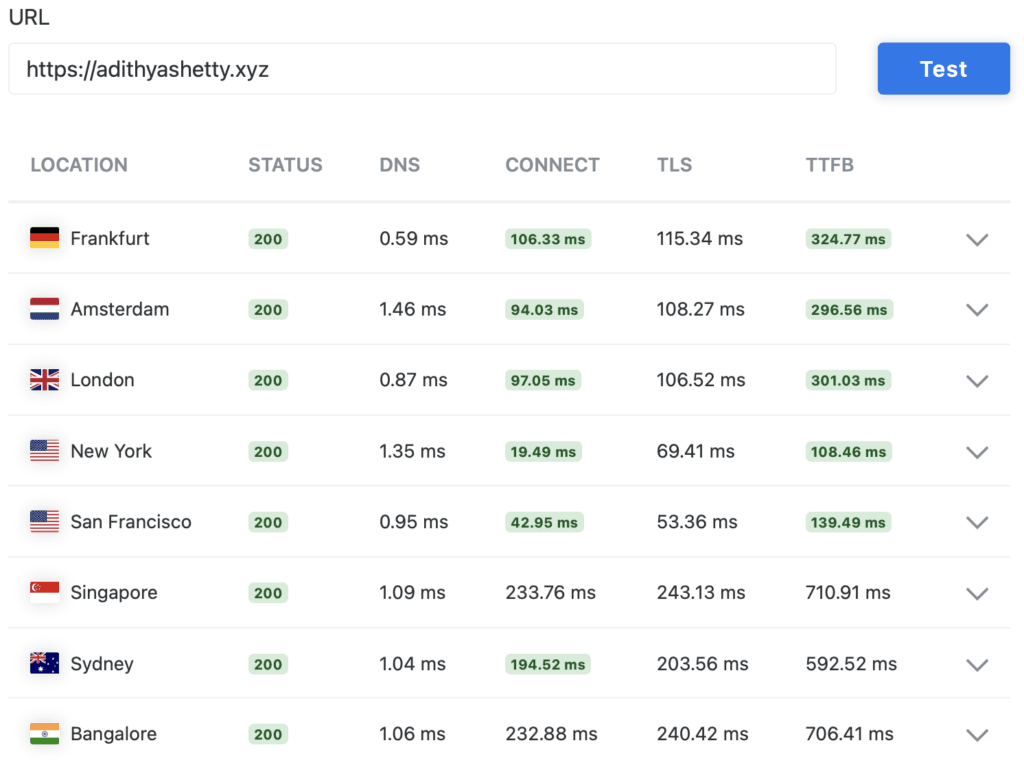
The above screenshot shows the TTFB score of a demo site using WPX XDN (CDN) with the W3 Total Cache plugin. It seems that WPX doesn’t have PoPs in Asia. I tested multiple times to make sure the results were accurate and consistent.
TTFB (with QUIC.cloud CDN & LiteSpeed Cache)
Let’s do the same TTFB, but this time with QUIC.cloud CDN and LiteSpeed Cache, which is built for LiteSpeed web servers. Unlike XDN, QUIC.cloud CDN offers dynamic caching with ESI support and has 78 PoPs across the World.
Unlike XDN, setting up QUIC.cloud takes a few extra steps, like changing the nameservers or adding a CNAME.
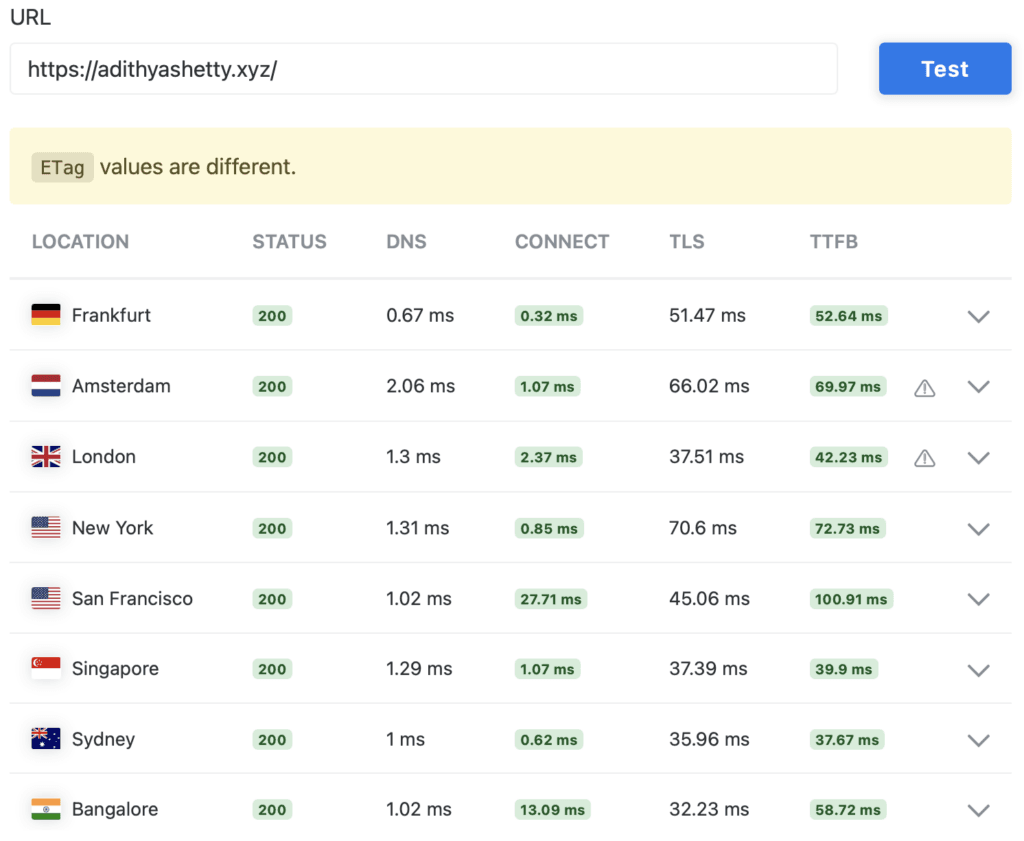
As you can see, the TTFB while using QUIC.cloud is lower (lower is better) than XDN’s score and covers all regions.
While QUIC.cloud offers a free plan, it only covers 6 CDN Nodes compared to the standard plan, which costs some extra dollars for the bandwidth if you have a high-traffic website.
Server Load Test
Let’s do some stress tests by using the Loader.io service, which allows us to simulate thousands of concurrent connections.
First, I will disable the cache plugin and CDN to find the real capabilities of the WPX server.
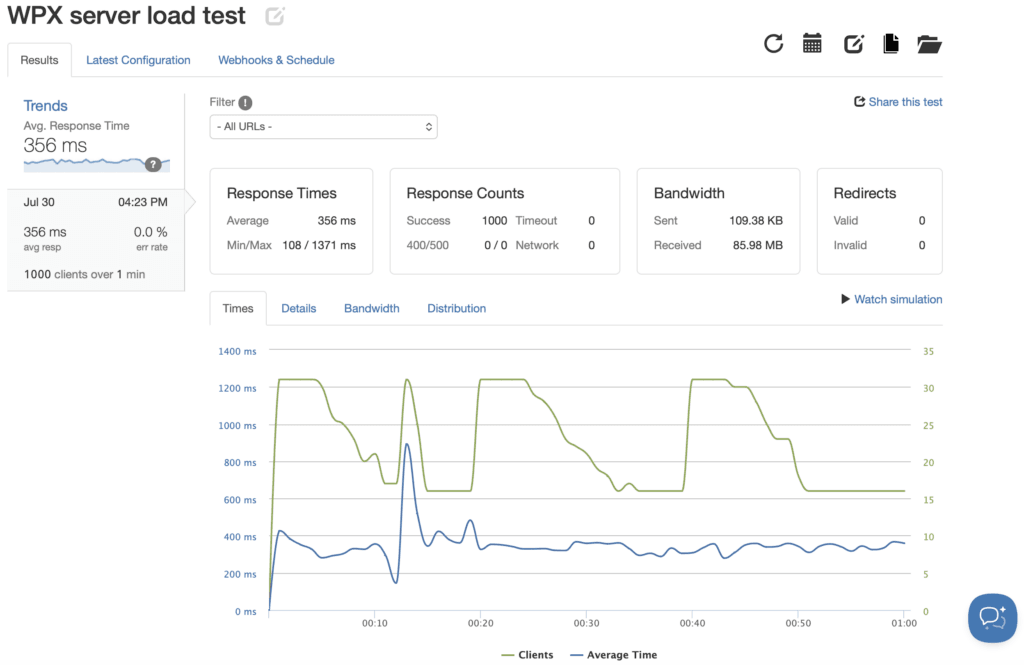
I sent 1000 Clients over 1 minute; it handled them with a 100% success rate, with an average response time of 356 ms.
With QUIC.cloud CDN & LiteSpeed Cache
Next, I conducted the stress test using QUIC.cloud CDN and LiteSpeed Cache, which is known to handle high request volumes.
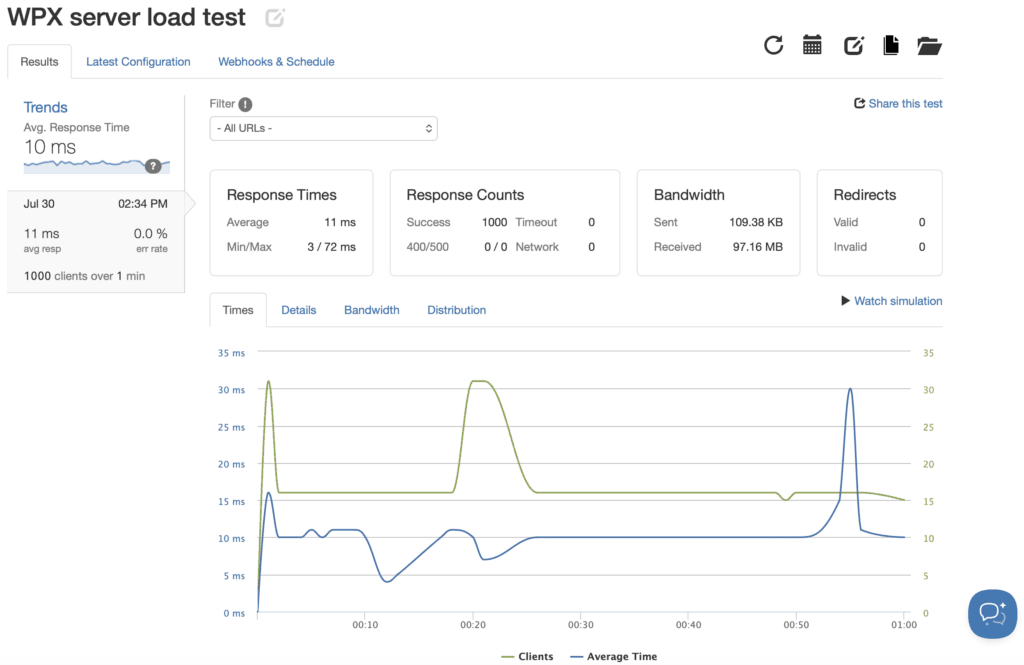
As you can see, the WPX server load test while using QUIC.cloud CDN & LiteSpeed Cache performed extremely well. I sent 1000 virtual clients over 1 minute; it handled it without any errors and with an average response time of just 10 ms.
With WPX XDN & W3 Total Cache
Now let’s do the same test using WPX’s built-in CDN, with the WPX-recommended W3 Total Cache plugin.
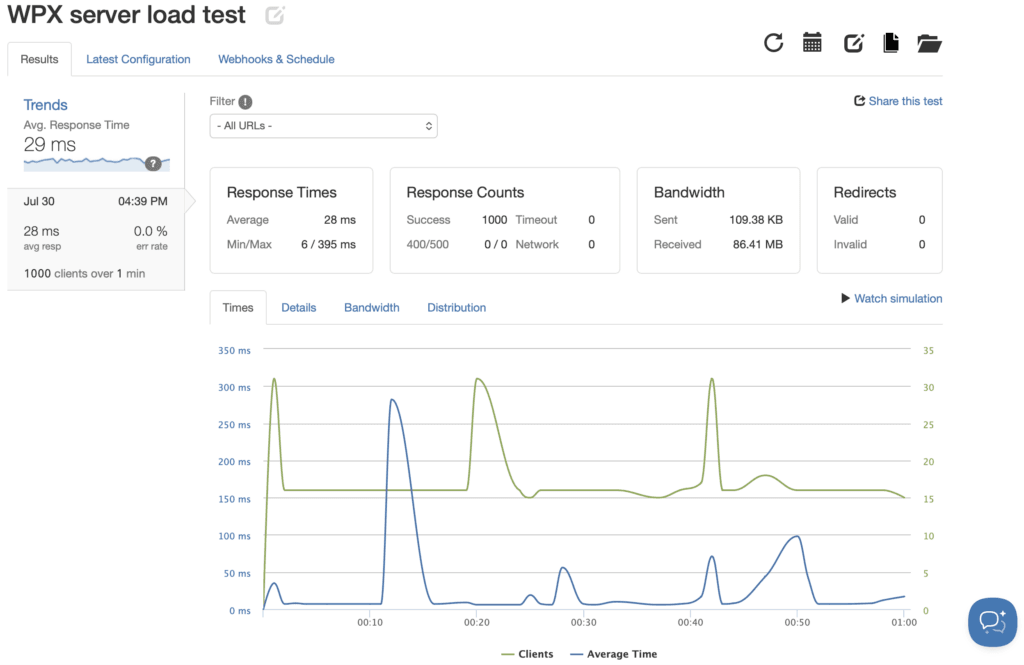
With XDN CDN and W3 Total Cache, it passed the stress test without any errors and with an average response time of 29 ms.
WPX Control Panel
WPX offers a custom-built control panel to handle your websites, domains, server, billing, etc on its management dashboard.
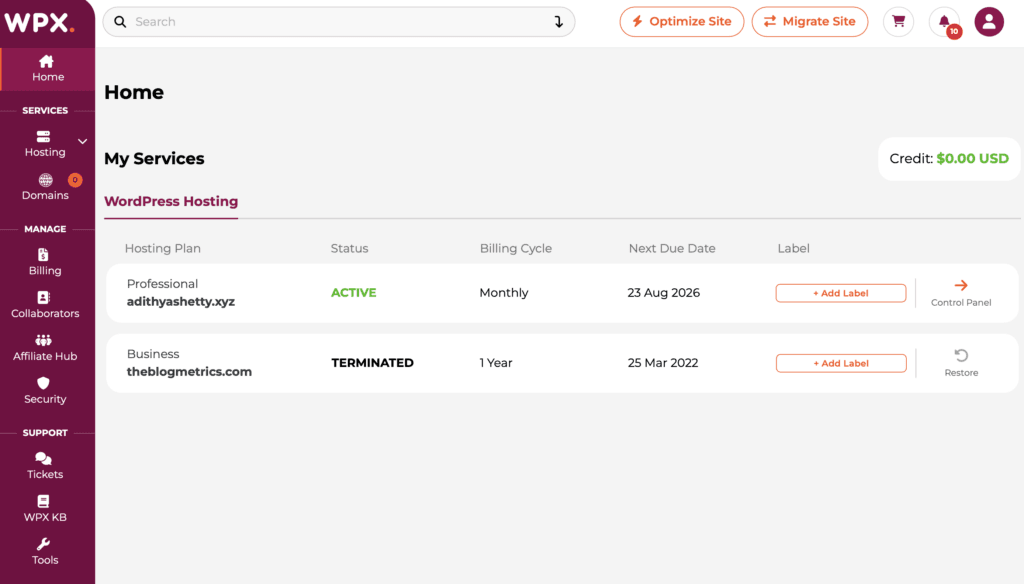
Unlike other hosting companies, the dashboard is quite simple, and beginners will find it easy to navigate.
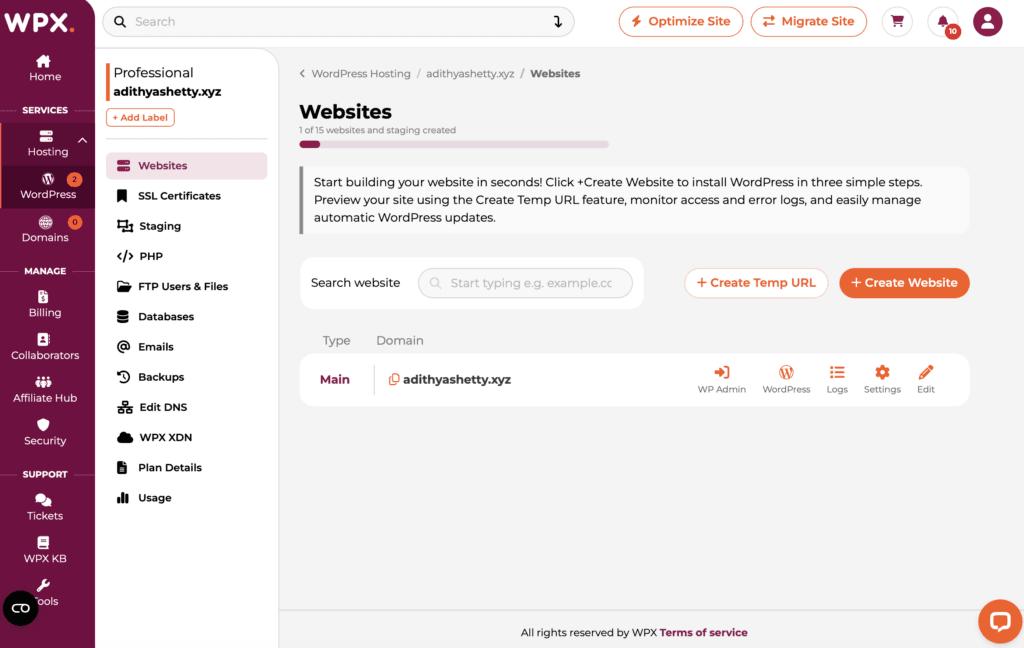
On the WPX control panel, you can create FTP accounts and access the File Manager directly.
Backups
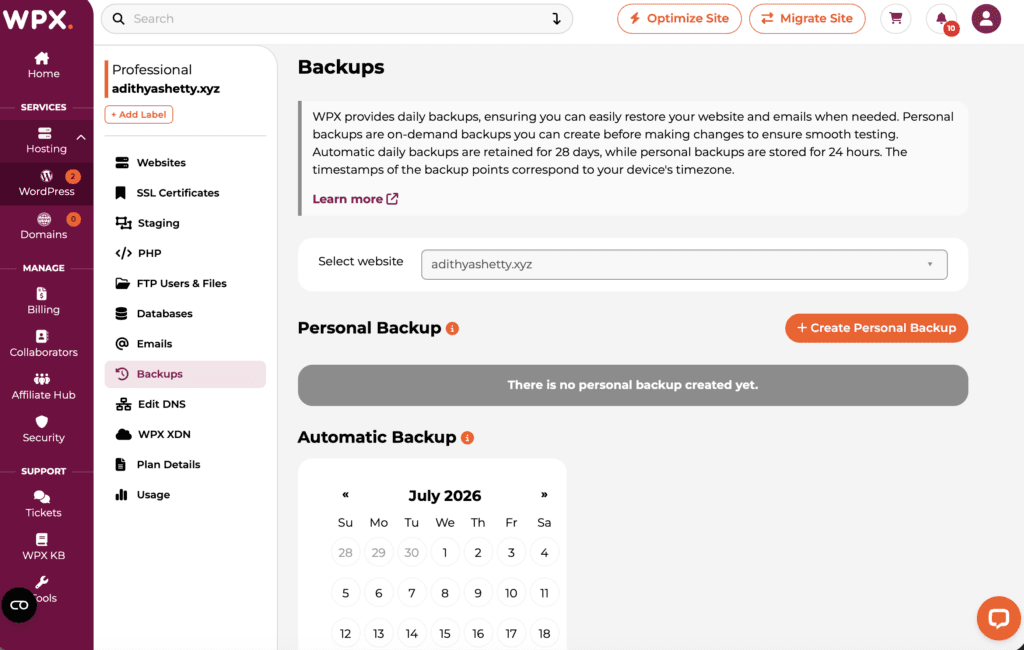
One important feature to look for while choosing a hosting provider is backups; WPX provides daily automatic backups, which you can restore with a few clicks in case something goes wrong with your website.
You can also create a personal backup to download your whole website data to your computer. Daily automatic backups are retained for 28 days, while personal backups are stored for 24 hours.
Staging
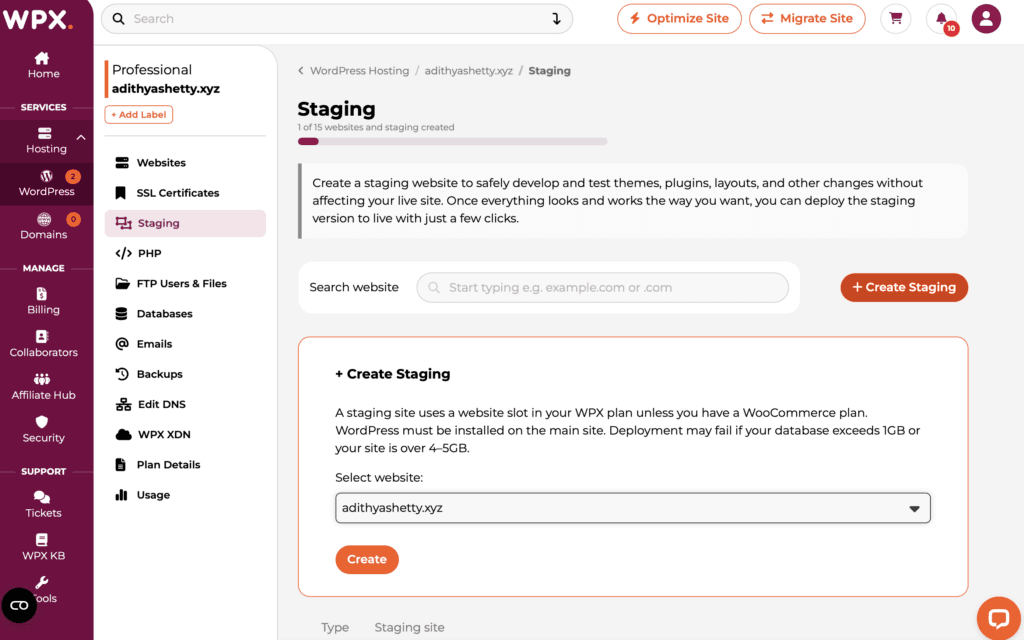
Staging lets you create a copy of your website to test changes you want to make with your themes, plugins, layouts, etc without affecting your live website.
It has some limitations and might fail if your database exceeds 1GB or your site is over 4-5GB.
Emails
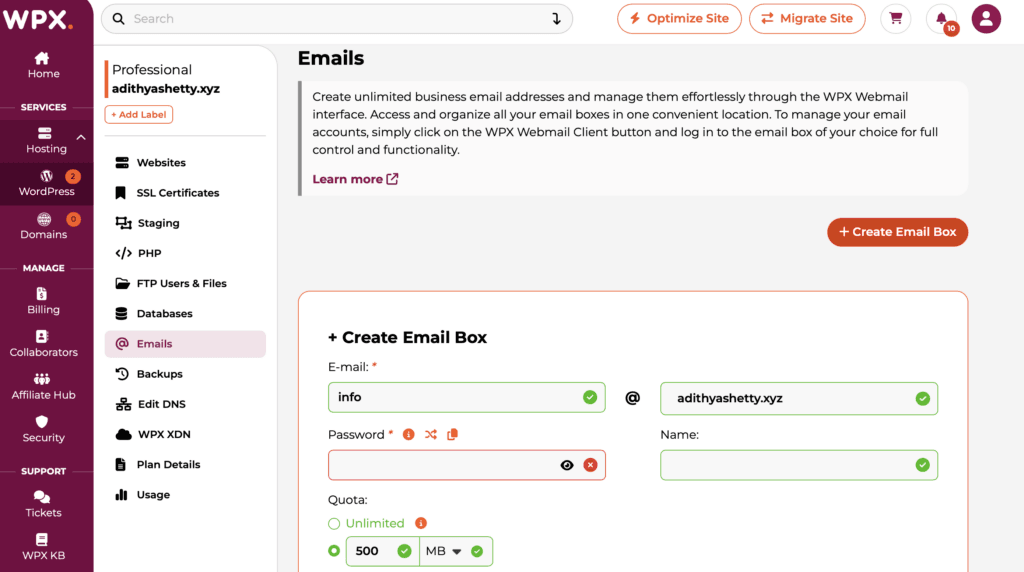
WPX lets you create and host unlimited business email addresses through the WPX Webmail interface.
This is an important feature, since email hosting services like Google Workspace cost extra if you have to purchase separately. It’s quite useful if you’re running a business organization and want to create multiple email addresses for your employees or members.
Uptime
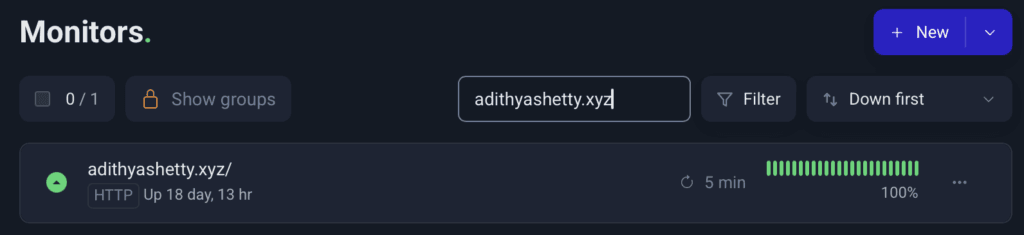
WPX provides a 99.95% uptime guarantee, and I didn’t see any downtime when I used them to host my website for three years until 2022. I also didn’t face any downtime-related issues during the recent testing.
Pricing
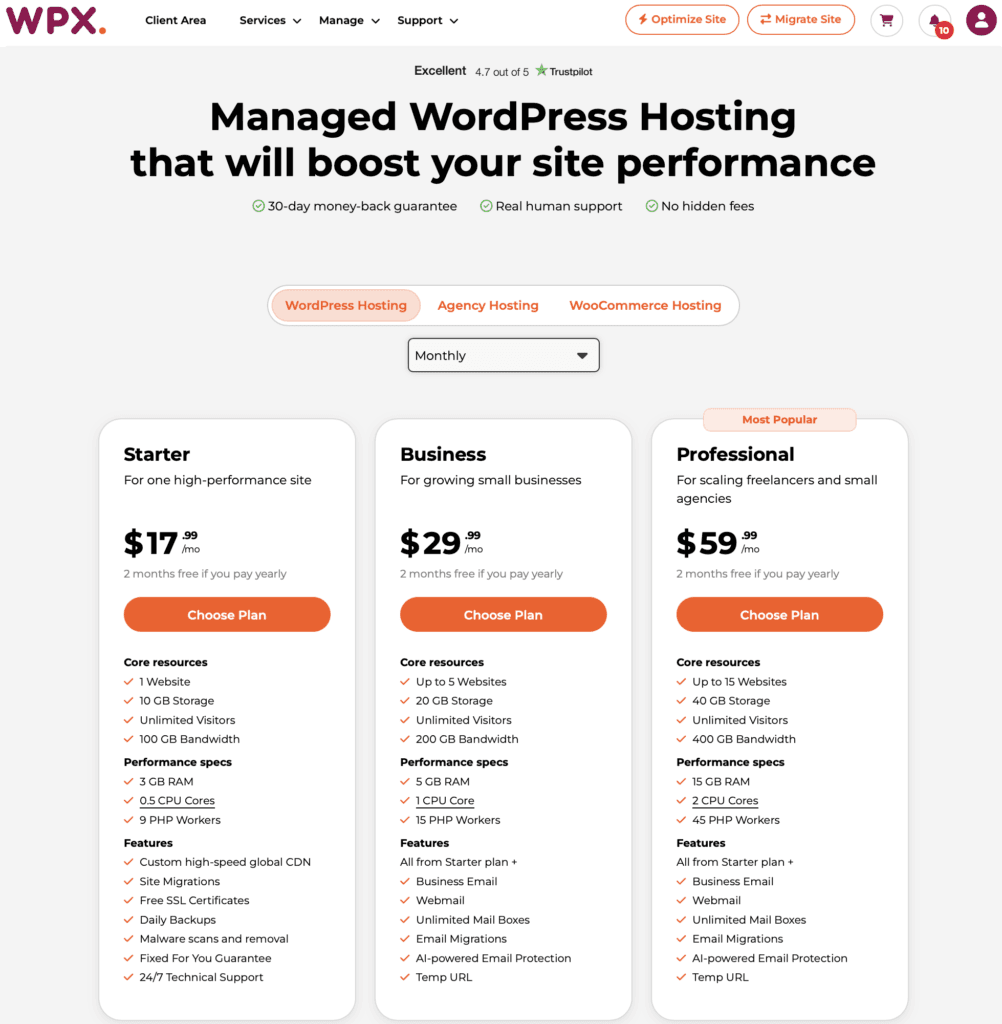
WPX offers three standard WordPress hosting plans, two Agency plans, and three WooCommerce plans.
Pricing can vary based on the term you select; you can purchase a hosting plan for up to 5 years in advance, which gives you a larger discount.
Let’s look at them in detail:
WordPress Hosting
- Starter: The base plan offers 10 GB of storage, 3 GB of RAM, 0.5 CPU Cores, with 100 GB of bandwidth for 1 website. Costs $17.99 per month or 14.99/mo on an annual purchase.
- Business: This plan supports up to 5 Websites with 5 GB of RAM and 1 CPU core. Starts at $29.99/mo.
- Professional: Starts at $59.99/mo, supporting up to 15 websites with 15 GB RAM and 2 CPU cores. This plan also offers a total of 45 PHP Workers.
Agency Hosting
This package is suitable for digital agencies that want to host several websites. There are basically 2 plans.
- Elite: Plan starts at $119.99/mo for up to 35 websites; comes with 35 GB RAM, 3 CPU Cores, and 105 PHP Workers.
- Agency: This plan costs $599.99/mo for up to 299 websites, 100 GB RAM, 6 CPU Cores, and 300 PHP Workers.
WooCommerce Hosting
There are three WooCommerce hosting plans WPX offers that are optimized for WooCommerce stores:
- Powerstore: This plan starts at $34.99/mo for 1 website with 8 GB RAM, 2 CPU Cores, 10 PHP Workers.
- Superstore: Priced at $74.99/mo on a monthly billing cycle for up to 3 websites. 50 GB of storage, Unlimited Bandwidth, 36 GB RAM, 3 CPU Cores, and 40 PHP Workers.
- Hyperstore: Costs $149.99/mo for up to 5 websites. Offers 100 GB Storage, Unlimited Bandwidth, 80 GB RAM, 4 CPU Cores, and 80 PHP Workers.
Exclusive Offers
WPX has offered a couple of exclusive promo codes to our readers. The discount is valid for new customers.
This promo code provides 60% off for the first month on monthly plans.

The code below provides 10% off the annual plan, which amounts to a free month. This one applies to the 1-year plan, not the longer multi-year terms.
You might also want to check out the latest WPX Black Friday hosting deals to avail massive discounts.
Customer Support
WPX offers 24/7 customer support via chat, forum, email, and a ticketing system. So any technical issues related to your website will be solved quickly.
They also claim that their average response time is 30 seconds on live chat support. WPX also has good customer feedback on Trustpilot.
Pros and Cons of WPX.com
Pros
- Custom-built CDN called XDN
- Stable server performance
- Free website migrations
- Free Speed Optimization service
- 30-second average response time on live chat support
- 99.95% uptime guarantee
Cons
- No Redis Cache for base plans; you need the Elite plan to enable Redis.
- Their CDN has only 41 PoPs.
- Beginners might find it a little expensive
- Only 3 data center locations to choose from
WPX Alternatives
NameHero: NameHero is first on the list and can be a good alternative to WPX; NameHero offers LiteSpeed web servers and natively recommends QUIC.cloud CDN. WordPress hosting plans are also cheaper.
Kinsta: Kinsta is another WordPress hosting provider that offers similar services; Kinsta offers a built-in CDN powered by Cloudflare. Read the detailed review with benchmarks of Kinsta here.
WP Engine: WP Engine is a little more pricey compared to WPX, but offers similar features.
Rocket.net: Among these WPX alternatives, I believe Rocket.net is the fastest with its built-in Cloudflare Enterprise integration. I’ve used it for nearly four years before moving my websites into a VPS.
Final Verdict
This site runs on OpenLiteSpeed using a netcup dedicated VPS, and I use LiteSpeed Cache with QUIC.cloud CDN to help improve my website’s TTFB. So, I recommend any managed hosting companies that offer LiteSpeed web servers.
Beginners might find WPX expensive, but you also get a CDN, LiteSpeed web server, and business email hosting with all plans.
While the CDN is not as good as Rocket.net’s Cloudflare Enterprise, it can help you reduce your website’s TTFB across continents. If you want to take advantage of the LiteSpeed web server, I recommend using the LS Cache and QUIC.cloud CDN combination.
Overall, WPX.net is a decent managed hosting provider for people who don’t want to worry about technical aspects.
FAQs
Does WPX.com offer domain registration?
Yes, you can register a domain name with FREE Whois Privacy on WPX.com.
What’s the refund policy of WPX.net?
WPX offers a 30-day refund Guarantee. You can try their hosting services without risk.
Does WPX offer a CDN?
Yes, WPX offers a custom-built CDN (Content Delivery Network) called XDN with 41 PoPs.
Does WPX offer Email hosting services?
Yes, email hosting is included with the web hosting plan, but not as a standalone product.
Does WPX offer reseller hosting?
No, WPX doesn’t offer reseller hosting, but you can purchase the Agency plan that supports up to 200 websites.
WPX Review

WPX is a managed WordPress hosting that offers high-performance hosting with its custom-built CDN.
Price: 17.99/mo
Price Currency: $
4.3