
I may earn commission if you use my affiliate links to purchase products: More details.
I’ve been testing WordPress.com for nearly a month and have written a couple of guides on starting an eCommerce store and a portfolio website. So, in this article, I will be sharing my insights and discoveries I made with this platform.
WordPress.com is a private company that offers a website builder with storage space to host your website.
Difference between WordPress.com & WordPress.org
WordPress.com is a commercial platform by Automattic that offers WordPress core software with hosting. While, WordPress.org is an open-source CMS (Content Management System) software that you can use to build a self-hosted website.
There are a few disadvantages to running a self-hosted WordPress website, such as hosting issues, technical glitches, or the lack of customer support. However, WordPress.com is an all-in-one solution for those who are hesitant or lack the technical skills to build a self-hosted website.
Overview of WordPress.com
Brand | WordPress.com (Automattic) |
Website: | |
Year Founded: | 2005 |
Headquarters: | San Francisco, California, USA |
Service Types: | WordPress hosting, website builder, domains, and email hosting (separate plan) |
Base Plan: | $9/mo on monthly plans or $4/mo on annual purchase |
Customer Support: | Forum, Ticketing, and Chat |
Data Centers: | Five primary data centers |
Uptime: | 99.999% |
Reliability: | Real-time Malware Protection, DDoS protection, WAF, spam protection |
Refund policy: | They offer a 7-day refund on monthly plans and a 14-day refund on annual plans |
CDN: | WordPress.com’s global CDN across 28+ data centers |
Email hosting: | Available |
Control Panel: | WordPress.com dashboard, WP Admin dashboard |
Domain Registration: | Available |
Competitors: |
WordPress.com Specifications
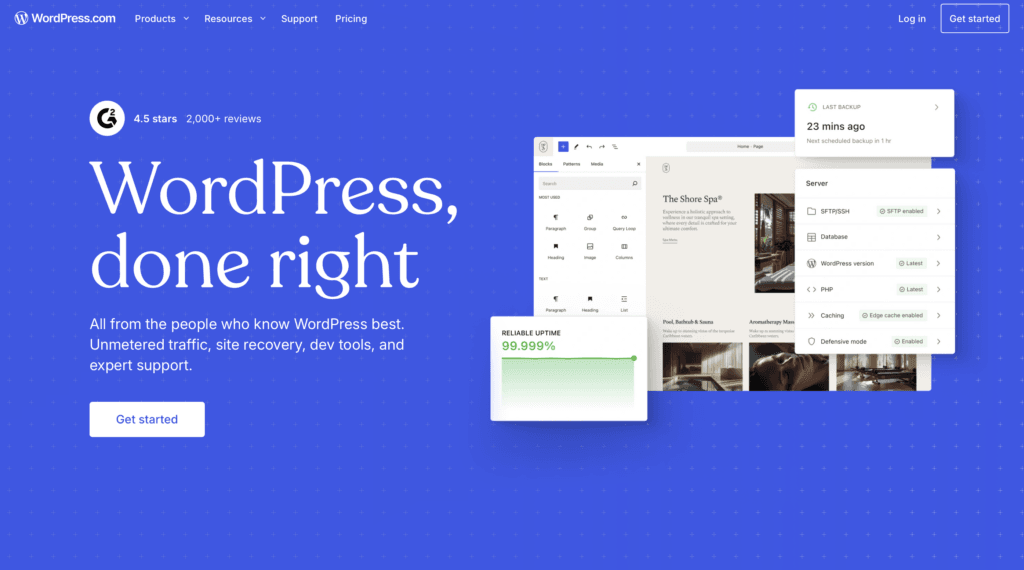
WordPress.com offers unlimited visitors, pages, posts, and users for all plans without restrictions. Unlike most web hosting companies, WordPress.com provides unrestricted bandwidth.
While the technical details are not publicly disclosed, they claim to use high-frequency CPUs. So I conducted a benchmark test using a plugin called WP Benchmark tool, which thoroughly evaluates the hosting server’s performance with various tests. Below are the results:
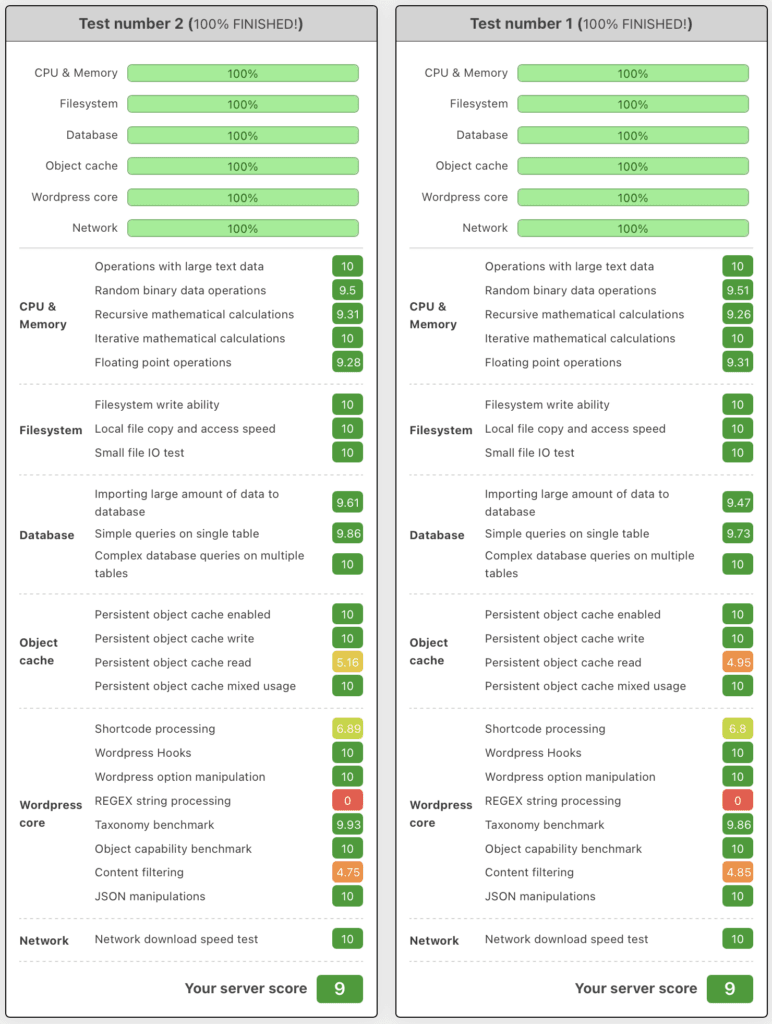
As you can see in the screenshot above, the WordPress.com server performed exceptionally well in the benchmark test, scoring 10/10 on most metrics. This score is on a par with most high-performing VPS providers.
Next, I’ve tested the base PHP functions of WordPress.com using a plugin called PHP Vitals.
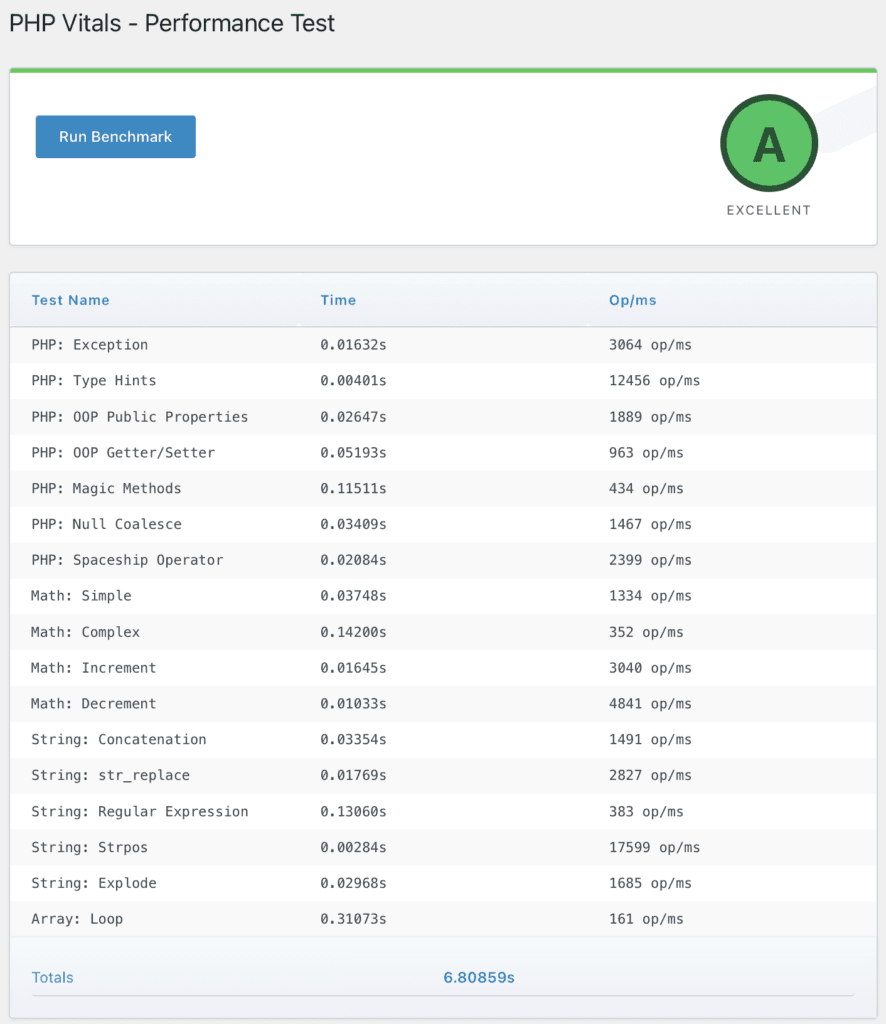
Once again, the server performed extremely well, scoring an A grade. This result shows how well the WordPress.com server is optimized for speed.
Regarding CDN (Content Delivery Network), WordPress.com uses its own global data centers across 28 locations to accelerate your website with edge caching techniques.
It also offers all kinds of security features like DDoS protection, WAF, spam protection, and isolated site infrastructure to protect you from bad neighbors.
Speed Test
Now that we have determined the server performance, let’s see how fast your visitors can access your website hosted on WordPress.com.
Before testing, I have installed a pre-built theme with content available on the WordPress theme directory. WordPress enables CDN by default using a Jetpack plugin, so I’ll keep the default settings.
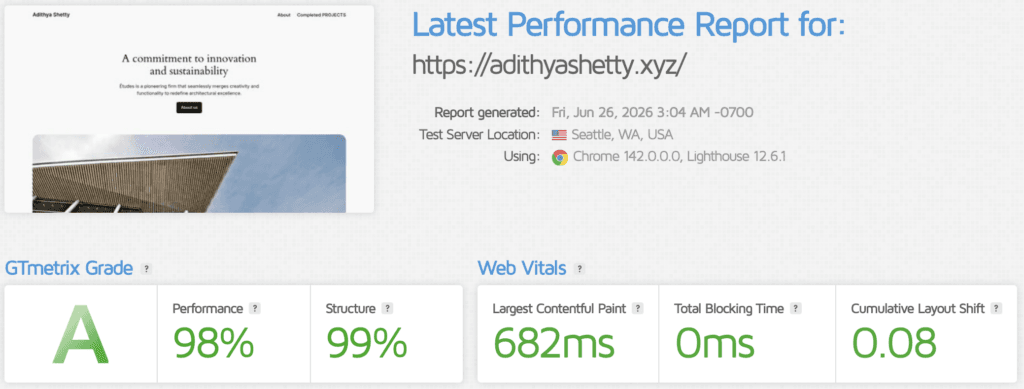
On the GTmetrix speed test, the website hosted on WordPress.com scored a near 100 with the default settings.
Now let’s test the Time to First Byte (TTFB) across the world, which shows the response time of a website.
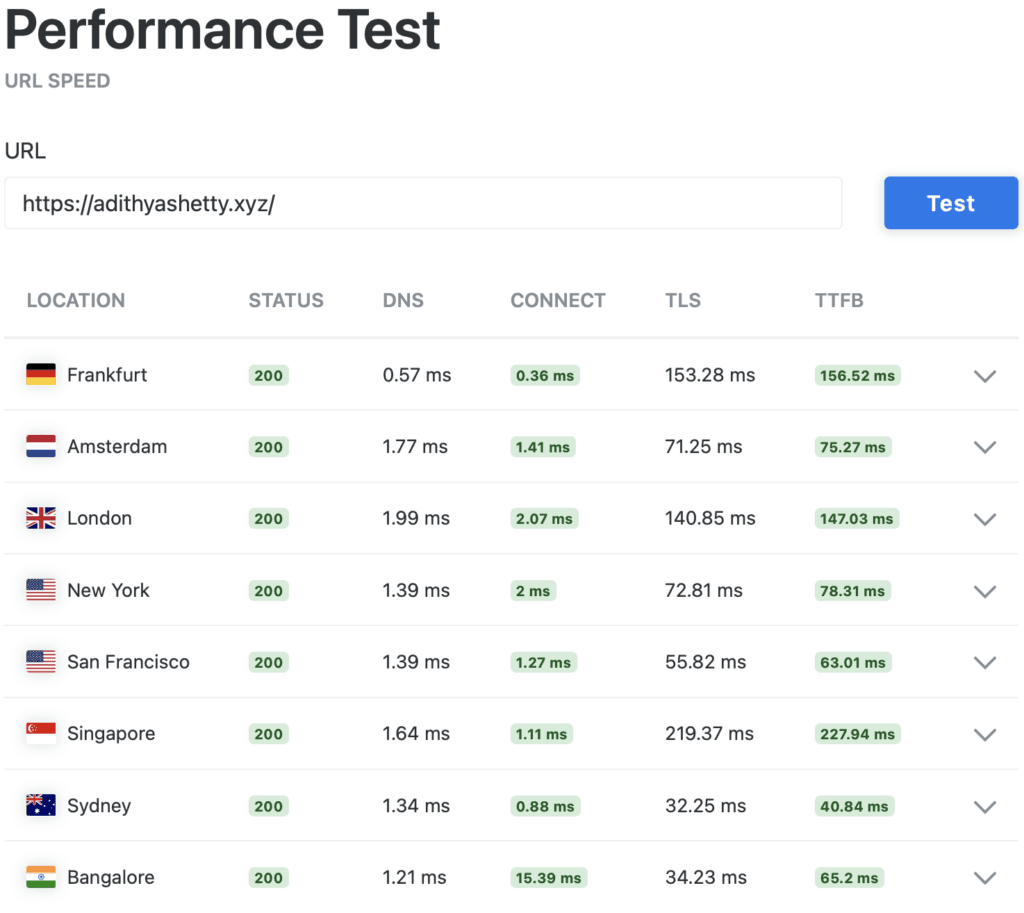
Because of its built-in CDN with 28 data centers across the world, TTFB tests across every location perform very well. This is important if you have an international audience.
WordPress.com Dashboard
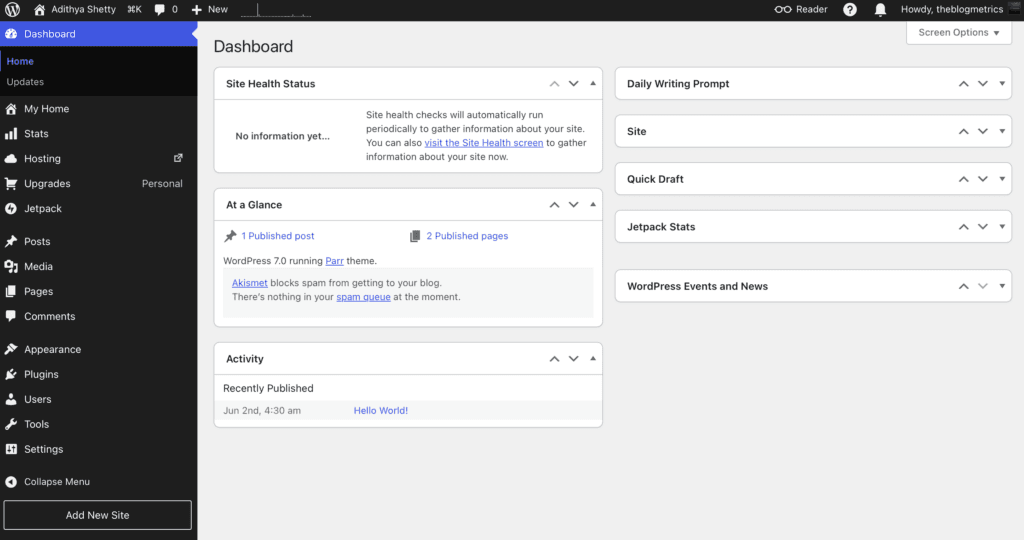
The dashboard of WordPress.com is intuitive and looks similar to the self-hosted open-source WordPress CMS.
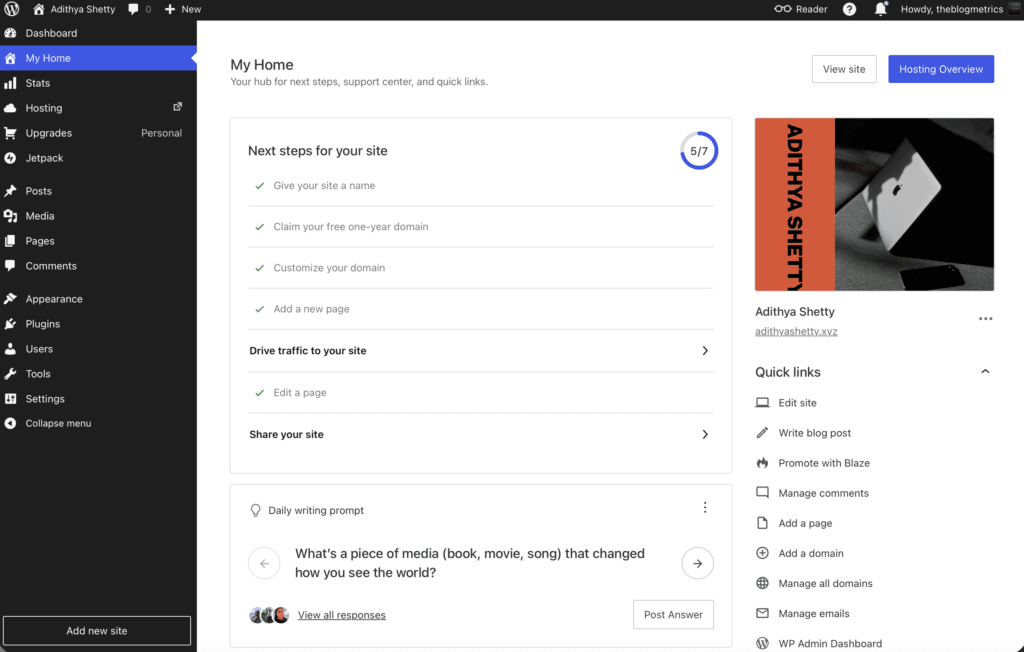
On the My Home dashboard, you can edit an individual website, write a blog post, add a page, change the theme, etc.
Pre-built Themes
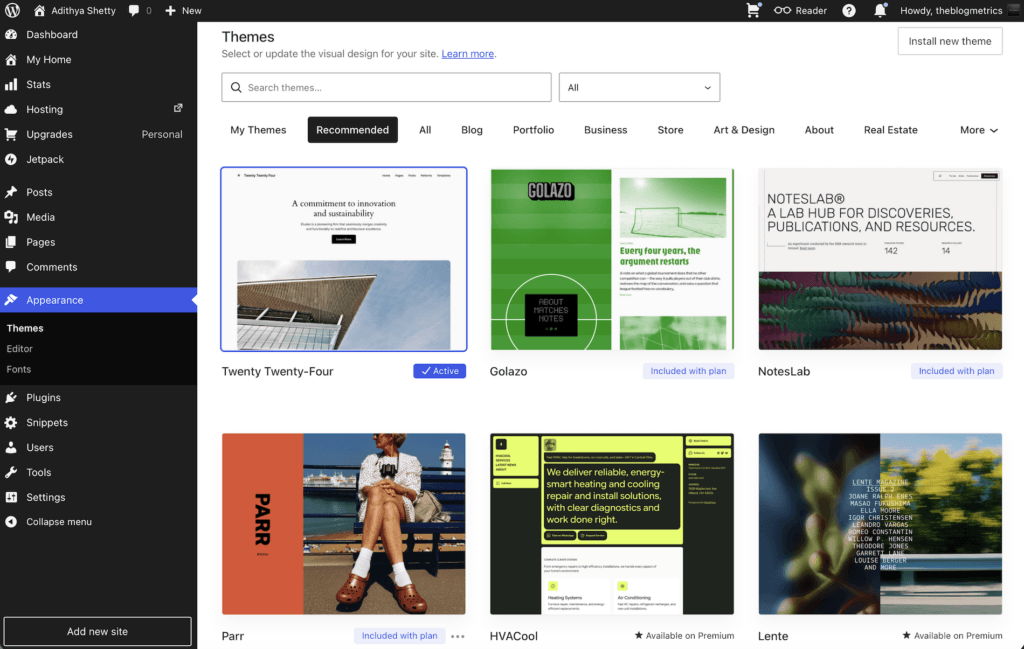
WordPress.com has thousands of pre-built templates to create a website within minutes, which is suitable for beginners who don’t want to rely on web developers. You can build any type of website, like a portfolio, Business, Store, Real Estate, etc.
Block Editor (Gutenberg)
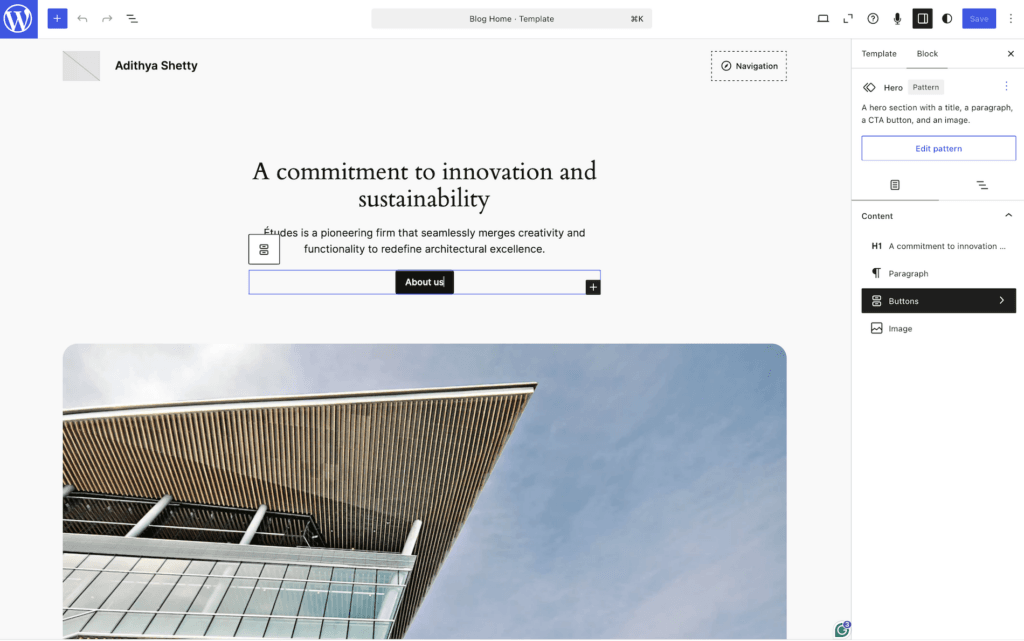
WordPress offers a block editor called Gutenberg to build and design your website, change color, typography, layouts, etc., the way you want.
The block editor is intuitive and supports block themes to create a custom block pattern that you can reuse.
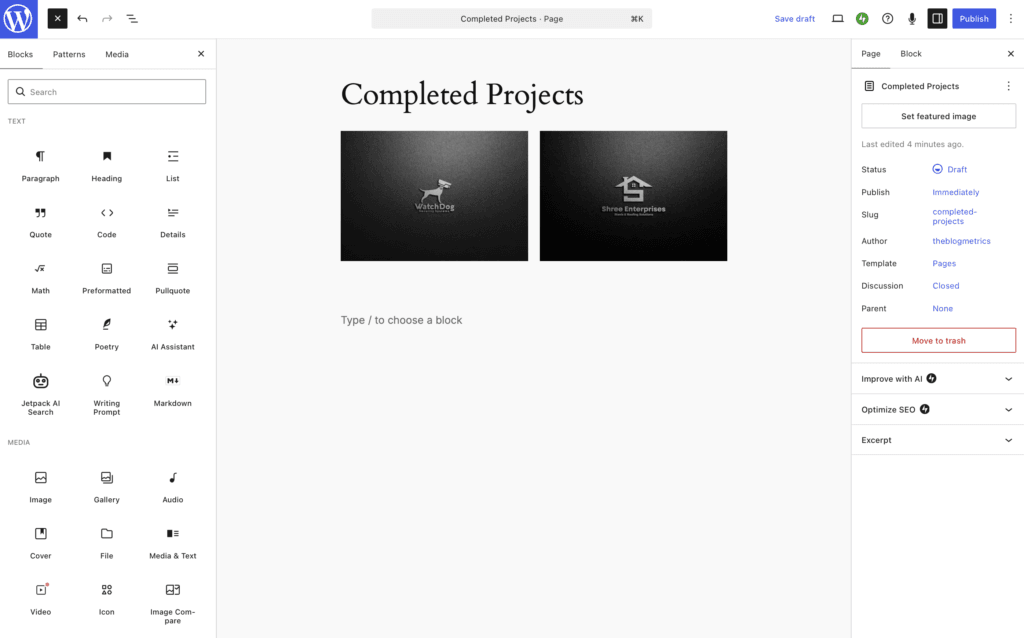
On the Gutenberg editor, you’ll get hundreds of blocks and patterns from the theme and plugins you installed that enhance the functionality of your website. This article is formatted on the Gutenberg editor as well, using a block plugin called GenerateBlocks by GeneratePress.
Uptime
WordPress.com claims a 99.999% uptime guarantee with unmetered bandwidth and traffic on all plans. I have been using a WordPress Personal plan for nearly a month, and I haven’t faced any downtime.
Pricing
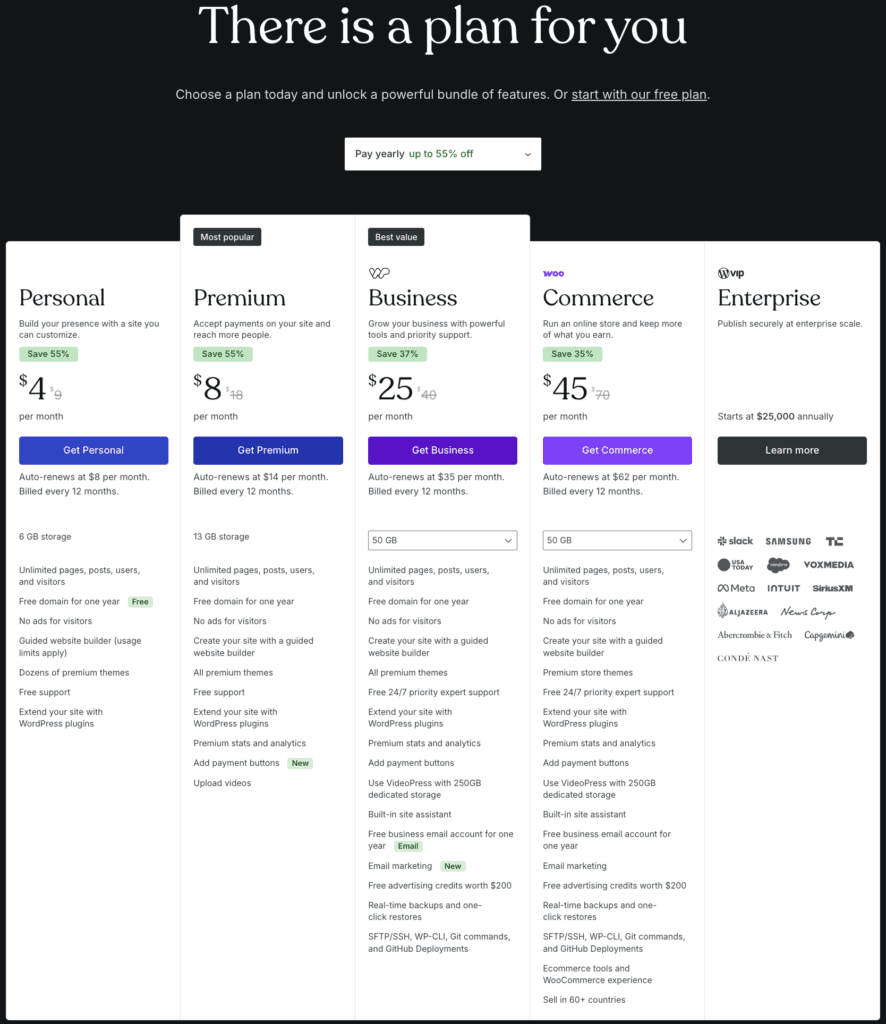
WordPress offers flexible pricing to suit all kinds of businesses. You’ll get some discounts on the annual purchase based on the plan and location. There are mainly four plans:
Personal: starts at $9 per month or $4/mo annually.
Premium: $18 per month or $8/mo on an annual purchase.
Business: starts at $40 per month or $25/mo on an annual purchase.
Commerce: Commerce plan that allows you to build a fully-fledged eCommerce website, starting at $70 per month or $45/mo annually.
They also offer an Enterprise plan, which starts at $25,000 per year, suitable for large-scale businesses.
Customer support
WordPress offers customer support on all paid plans. However, for the Business plan and above, you’ll get 24/7 priority expert support.
You’ll have customer support via an AI assistant, Chat, forum, and Ticketing.
Pros and Cons of WordPress.com
Pros
- WordPress.com offers a free domain for the first year
- WordPress takes care of the core software, security, and maintenance
- The AI Website Builder feature lets you build a functioning website with a prompt
- Offers an in-built CDN for all of its plans
- Free customer support on all paid plans
- Highly optimized servers
- Unlimited Visitors (unrestricted bandwidth) for all plans
Cons
- Takes a bit of a learning curve to get familiar with the Gutenberg editor, which works a little differently than the traditional drag & drop builders
- Lower-level plans don’t allow you to directly edit PHP theme files
- Many add-ons or themes require additional purchases
- You need a Commerce plan to add the integrated store experience and bundled premium extensions
- Requires a Business or higher plan for SFTP/SSH, WP-CLI, etc
- Personal plan only offers 6 GB of storage
WordPress.com Alternatives
Wix: Just like WordPress.com, Wix is a website builder platform that you can use to create a website in minutes.
Squarespace: Squarespace can also be used to easily create a website. However, the pricing starts at $25/mo. It is a little expensive compared to WordPress.
Shopify: Shopify is primarily meant for eCommerce websites, but you can also use it to build any other type of website.
Final Verdict
There are some upsides as well as some downsides to WordPress.com. The major upside is that the initial cost of WordPress is lower than that of most of its competitors and takes care of everything related to the core software.
However, the lower-end plan comes with a few limitations, like no SFTP/SSH, not being able to edit PHP theme files, etc. Also, beginners might find the Gutenberg editor a little irritating.
Do I recommend WordPress.com? Looking at the server benchmark results, definitely yes. However, all my websites are built on the self-hosted WordPress CMS, which has zero limitations. But if you’re just getting started and don’t want to stress about web hosting and all, go for WordPress.com.
FAQs
Does WordPress.com offer domain registration?
Yes, WordPress.com offers a domain registration service. You can also get a free domain for the first year.
Does WordPress.com offer refunds?
Yes, they offer a 7-day refund on monthly plans and a 14-day refund on annual plans.
Does WordPress.com offer Email hosting?
Yes, WordPress.com does offer email hosting as a separate service, not included with hosting plans.
WordPress.com Review

WordPress.com is a website builder platform that lets you create and design your site within minutes.
Price: 4
Price Currency: $
Application Category: WordPress.com
4.2