
I may earn commission if you use my affiliate links to purchase products: More details.
A fast website improves user experience and boosts your Google rankings. But it can be challenging if you’re not a developer.
Redesigning your website can be time-consuming and probably require hundreds of hours of development. However, in this article, I will share my methods to speed up your website and achieve a perfect 100 score on the Google Page Speed Insights and Core Web Vitals with ease.
Core Web Vitals are a set of metrics Google uses to measure a website’s performance and user experience. A Good Core Web Vitals score will ensure a better visitor experience.
So, let’s get started:
Reasons to Speed Up Your WordPress Website
In this AI era, a slow website is unacceptable, and it’ll definitely reduce your conversion rate. By improving the speed of your website, you can dramatically increase performance and Google Ranking.
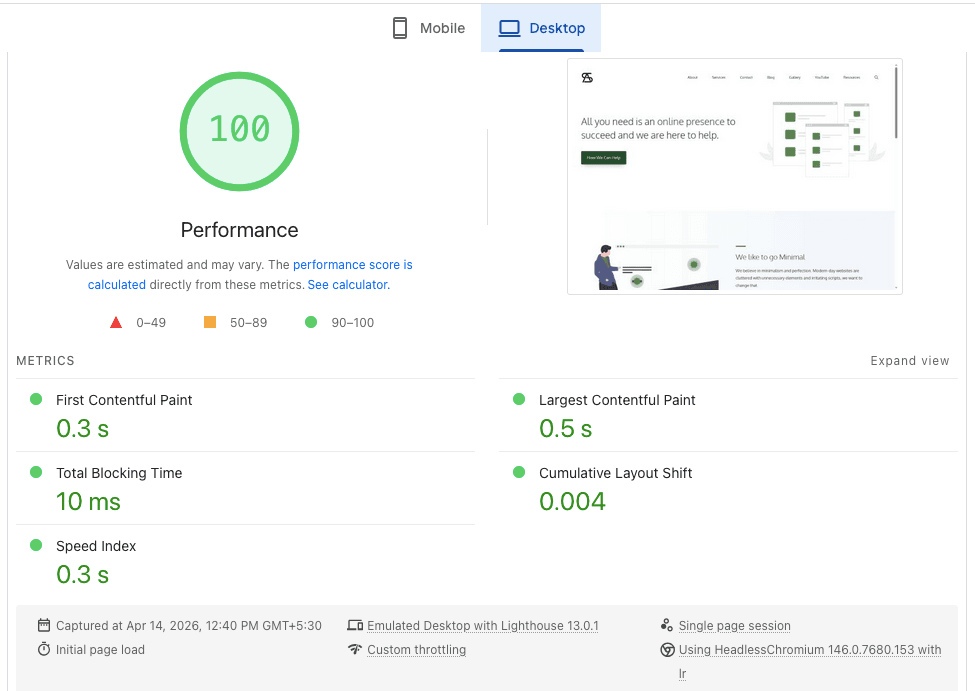
In this article, I will share my knowledge on how I achieved a perfect 100 score on Page Speed Insights for all of my blogs.
Pick a stable web host.
One of the first aspects to improve your website is to pick a good, stable web hosting provider; currently, this website is hosted on an unmanaged VPS called netcup with dedicated resources.
Previously, I used a managed WordPress hosting provider called Rocket.net for nearly four years for my main blog, and they were quite good at offering features like Cloudflare Enterprise CDN.
The reason for the migration is pricing; while I paid $30 per month to host a single site, with netcup’s root servers, I not only get a dedicated 4 Core CPU with 8 GB RAM for just €14.87, but I can also host unlimited websites using any open-source control panel.
Use OpenLiteSpeed or LiteSpeed Web Server
OpenLiteSpeed (OLS) WordPress is an open-source web server optimized for WordPress with a built-in LiteSpeed Cache plugin. The premium version of this is called LiteSpeed Enterprise, which offers a few more features than the open-source one.
There are two ways to use OpenLiteSpeed or LiteSpeed Web Server: one is by choosing a LiteSpeed Managed WordPress Hosting Provider, and the second option is by using an unmanaged VPS, which requires some technical and Linux administration skills, but it will help you save some money.
I use an open-source control panel called CyberPanel on my unmanaged VPS to host my OpenLiteSpeed WordPress websites. The best thing about this is that you can host an unlimited number of websites as long as your hosting server can handle them. You can check out my old guide to install CyberPanel on a VPS server (make sure to choose the most recent supported version of Ubuntu).
Why do I use OpenLiteSpeed?
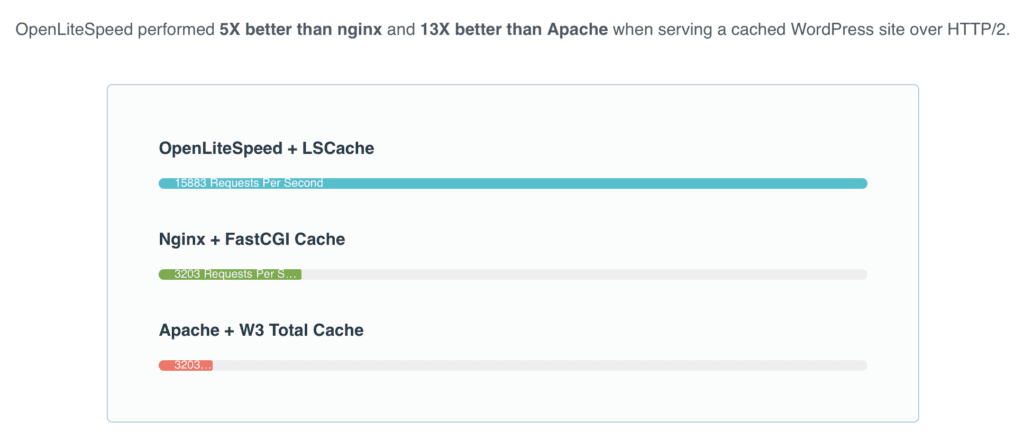
OpenLiteSpeed with the LSCache plugin can handle more requests and offer better performance than the other two web servers. This setup allows you to host your websites with low-memory VPS plans. However, I use netcup’s Root server, which is quite powerful.
Below are the recent performance results of my netcup root server running OpenLiteSpeed WordPress, tested using the WordPress hosting Benchmarking plugin.
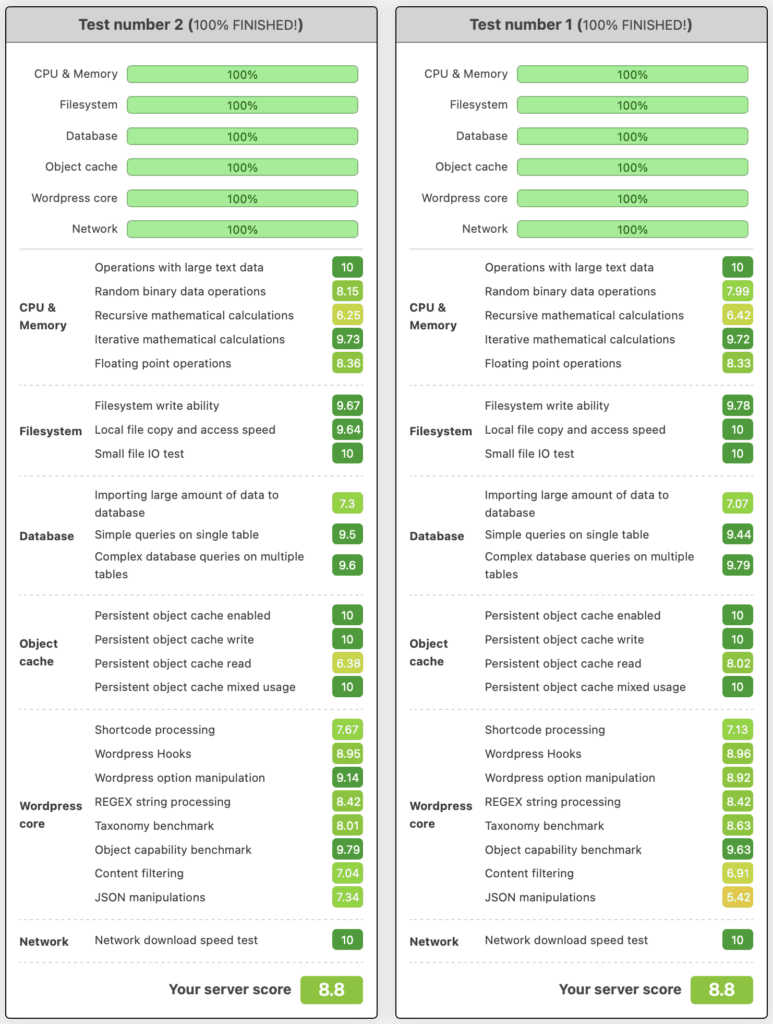
As you can see in the above screenshot, I have managed to achieve high performance scores using just a few open-source platforms.
OpenLiteSpeed’s free LSCache plugin, along with their QUIC.cloud CDN can help you avoid a lot of unnecessary plugins; with these, you can optimize images, pages, CSS/JS minification, database optimization, etc. LSCache also offers server-level caching, unlike other traditional plugins, which results in better response time.
You can also boost the speed of the site by using Redis or Memcached within the LSCache plugin. This plugin also comes with Cache Configuration Presets that let you configure your site in one click.
QUIC.cloud CDN also offers Edge caching for both dynamic and static content, security features like DDoS/brute-force protection with CAPTCHA, etc.
Use a lightweight theme.
Another simple method to speed up your website is by using a lightweight, SEO-friendly theme; there are tons of free and premium WordPress themes on the market, but not every theme is good. Using a theme that’s cluttered with unnecessary features for your project can significantly slow down your website.
Why do I use GeneratePress?
I’ve been using the GeneratePress premium version theme for a few years now, and quite satisfied with it. GeneratePress is not only lightweight, but it also comes with GenerateBlocks, which eliminates the need to use any third-party page builders that might bloat your website.
The GeneratePress Premium version also offers a professionally designed pre-built template called Starter Sites that can help you save time. They also offer a free version for building simple websites. You can read my GenesisPress Review to know more.
Use a Good Content Delivery Network (CDN)
By using a good Content Delivery Network (CDN), you can speed up your website by caching your static and dynamic files across the World.
Cloudflare is one of the most popular CDNs that offer both free and premium plans; the free plan alone offers quite a good number of features, including PoPs from 330+ data centers located across the globe.
If you need more advanced features of Cloudflare, consider using hosting providers that offer Cloudflare Enterprise CDN, which offers Edge Caching, Argo Smart Routing, Advanced WAF, etc.
I use QUIC.cloud on this blog, which also offers similar features to Cloudflare, but it’s specifically designed for OpenLiteSpeed and LiteSpeed WordPress. They provide edge caching for dynamic content, image optimization, page optimization, and advanced security to mitigate DDoS attacks.
With the LiteSpeed Cache’s Smart Purge technology, QUIC.cloud CDN serves your most recent static and dynamic content to your visitors.
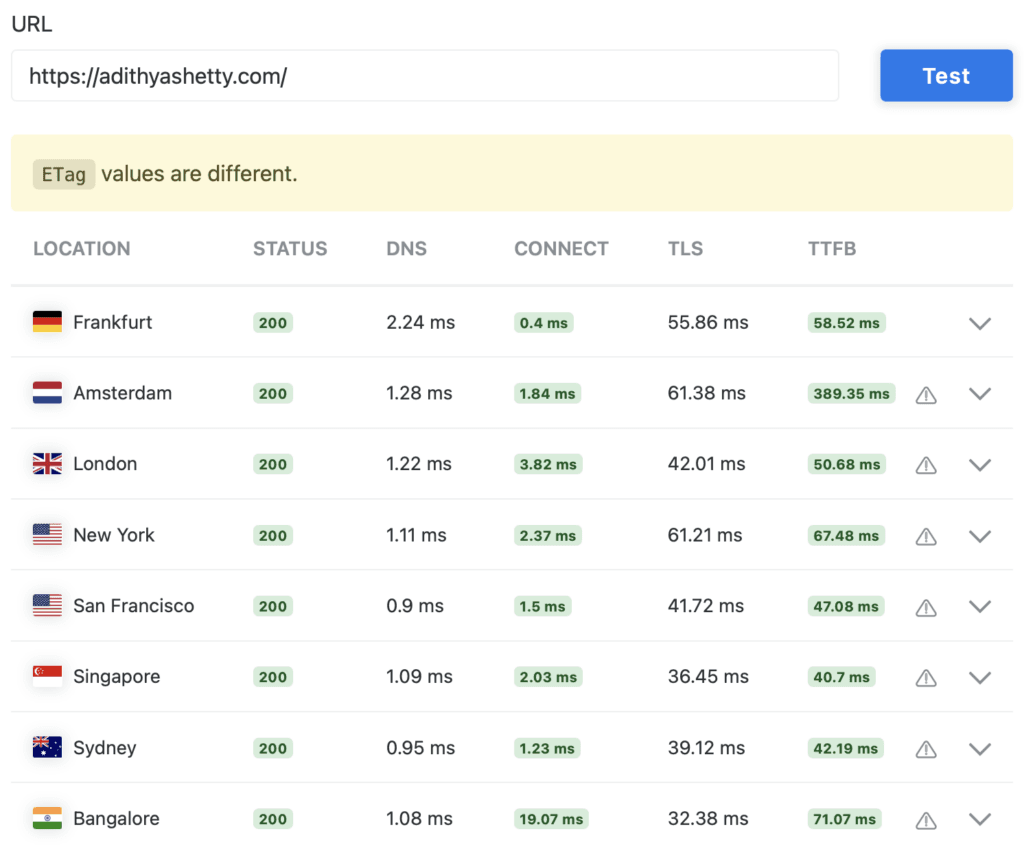
QUIC.cloud CDN will improve the TTFB of your website by a significant margin, sometimes even better than Cloudflare Enterprise.
Conclusion
In this post, I’ve shared my best methods to speed up your WordPress hosting without hiring a developer and get a perfect score on the Google Page Speed Insights.